Blog
Why Your iPhone Microphone Stops Working (And How We Fix It in Orlando)
You’re on an important call and the other person keeps saying, “I can’t hear you.” You check your volume, it’s fine. You restart the phone, still nothing. If your iPhone microphone is not working in Orlando and you have no idea why, you’re not alone. This is one of the most frustrating issues iPhone users face, mostly because it’s invisible. There’s no cracked screen to point to, no obvious damage, just silence on the other end of the line.
The good news? Most microphone issues are fixable. Here’s what’s actually going on and how we handle it every day at Mobile Mobile Orlando.
The iPhone Actually Has Three Microphones — Did You Know That?
Most people don’t realize this, and it’s the key to understanding why the problem can feel so random.
Your iPhone has three separate microphones:
- Bottom microphone used during regular phone calls and voice memos
- Front microphone used during FaceTime and selfie videos
- Rear microphone used when recording video with the back camera
This means your mic might work perfectly on calls but fail during video recording or vice versa. When customers come into our shop saying “my mic works sometimes,” this is almost always why. One microphone has failed while the others are still fine.
Knowing which microphone is affected helps us diagnose the issue faster and saves you time.
Common Reasons Your iPhone Mic Stops Working
Before assuming the worst, it helps to understand what typically causes this problem. Here are the most common culprits we see at our Orlando repair shop:
1. Physical Blockage or Debris
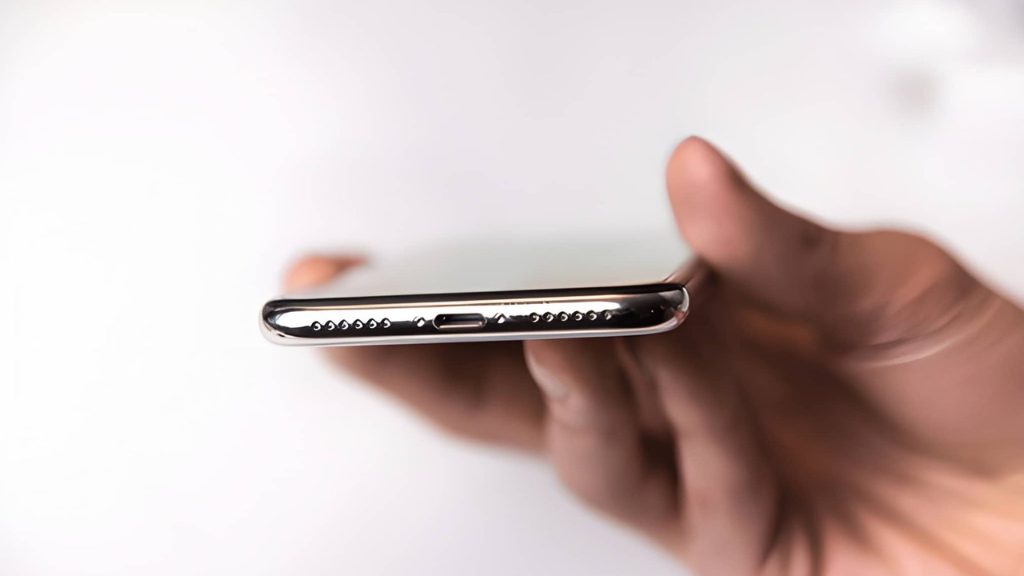
Orlando’s weather means humidity, dust, and outdoor activity. Sand, lint, and debris collect in the tiny mic grilles at the bottom of your phone over time. This is more common than people think and is often the simplest fix.
2. A Software Glitch or App Permission Issue
Sometimes it’s not hardware at all. A specific app might not have permission to use your microphone, or a recent iOS update may have caused a conflict. This is worth checking before assuming you need a repair.
3. Water or Moisture Damage
Even “water-resistant” iPhones are not waterproof. Pool water, rain, sweat, or a quick drop in a sink can damage the delicate microphone components inside. You might not see any visible damage, but internally, corrosion can build up over time and slowly kill your mic.
4. A Faulty Third-Party Case or Accessory
Believe it or not, a thick case that covers your mic grille, or a cheap headphone adapter, can muffle or block the microphone signal entirely.
5. Hardware Failure
If none of the above apply, the microphone component itself may have worn out or been damaged. iPhones are built tough, but internal components do fail, especially on older models or devices that have been dropped.
Quick Fixes to Try at Home Before Visiting a Repair Shop
We always want to save you a trip if possible. Try these steps first:
- Restart your iPhone. Simple, but it clears temporary glitches that can block mic access.
- Check app permissions. Go to Settings → Privacy & Security → Microphone and make sure the app you’re using has access turned on.
- Clean the microphone grille gently. Use a soft, dry toothbrush to lightly brush the bottom speaker and mic area. Never use water or compressed air directly into the port.
- Remove your case. Test the mic without the case on to rule out any blockage.
- Test with a different app. If Voice Memos works but Instagram doesn’t, it’s an app-level issue, not a hardware problem.
- Update iOS. An outdated operating system can sometimes cause audio conflicts. Go to Settings → General → Software Update.
If you’ve tried all of these and your iPhone mic is still not working, it’s time to bring it in.
When DIY Doesn’t Cut It: What Professional iPhone Microphone Repair Looks Like
This is where most people get stuck. They’ve Googled everything, tried every fix, and the mic is still dead. That’s exactly when professional diagnosis makes the difference.
At Mobile Mobile Orlando, here’s how we approach iPhone microphone repair:
Free Diagnostic First
We never guess. Our technicians run a full diagnostic on your device to identify exactly which microphone has failed and why. If you get the repair done with us, the diagnostic is completely free.
OEM-Grade Parts Only
We don’t cut corners with cheap third-party components. Every microphone we install is OEM-grade, meaning it matches the quality of what Apple originally put in your phone. This matters for call clarity and long-term reliability.
Most Repairs Done in Under an Hour
You don’t need to leave your phone with us for days. In most cases, iPhone microphone repair is completed while you wait. Walk in, and walk out with a working phone — usually within the hour.
Warranty on Every Fix
Every repair we do comes with a warranty. If something isn’t right after you leave, we’ve got you covered.
How to Know If Your iPhone Microphone Needs Professional Repair in Orlando
Still not sure if it’s worth coming in? Here are clear signs that a professional needs to take a look:
- People on calls consistently say they can’t hear you, even after a restart
- Your voice memos record with no sound or heavy static
- FaceTime video works but your audio cuts out
- Your microphone worked fine before a recent drop or water exposure
- You’ve tried every software fix and nothing has changed
If any of these sound familiar, don’t wait. A failing microphone often gets worse over time, especially if moisture or corrosion is involved.
Frequently Asked Questions
Q: Can a software update fix my iPhone microphone not working in Orlando?
A: Sometimes, yes. A buggy iOS update can cause mic issues, and installing the latest update can resolve it. But if the problem is hardware-related, no software update will fix it; you’ll need a physical repair.
Q: How much does iPhone microphone repair cost?
A: The cost depends on your iPhone model and which microphone is affected. We offer transparent pricing at Mobile Mobile Orlando, bring your phone in for a free diagnostic and we’ll give you an exact quote before any work begins.
Q: My iPhone mic works on calls but not on videos. Is that a different problem?
A: Yes, as explained above, your iPhone has three separate microphones. If only one is failing, it will affect specific functions while leaving others working fine. Our technicians can identify exactly which one needs attention.
Q: Will I lose my data during a microphone repair?
A: No. A microphone repair is a hardware fix and does not affect your data, apps, or settings. We always recommend backing up your device beforehand, just as a best practice.
Q: How long does iPhone microphone repair take at Mobile Mobile Orlando?
A: Most microphone repairs are completed in under an hour. We’ll give you a time estimate as soon as we’ve completed the diagnostic.
Get Your iPhone Mic Fixed Fast in Orlando
A broken microphone makes your iPhone feel like it’s only half a phone. Whether you’re missing calls, struggling on FaceTime, or your voice recordings come out silent, the fix is usually faster and more affordable than you’d expect.
If your iPhone microphone isn’t working in Orlando, don’t spend another day frustrated with DIY attempts that lead nowhere.
Visit Mobile Mobile Orlando on Orange Blossom Trail or send us your device today — most repairs are done in under an hour and diagnostics are free when you get the repair done with us.

Related Posts